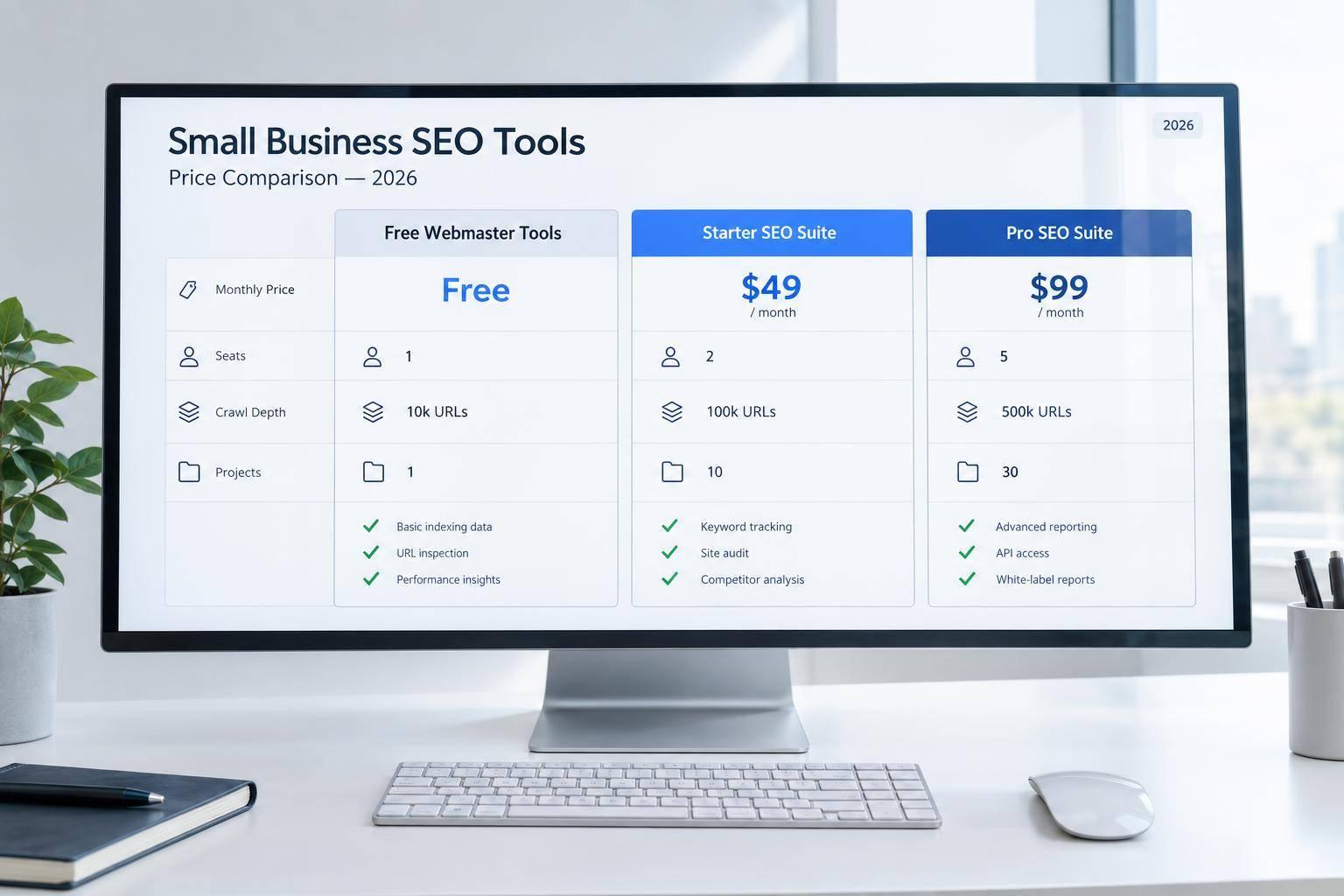
I’d start with $0 tools and pay only when you need more research, tracking, or reporting. Google Search Console, Bing Webmaster Tools, and Ahrefs Webmaster Tools cover your own site without a subscription. The listed paid options include Moz Pro Starter at $49/month and Semrush Pro at $139.95/month.
I compare 10 tools by price, billing terms, seats, keyword limits, crawl depth, and reporting. My buying rule: <u>count seats and add-ons before choosing a plan</u>, then budget separately for fixing the issues it finds.
Quick Comparison
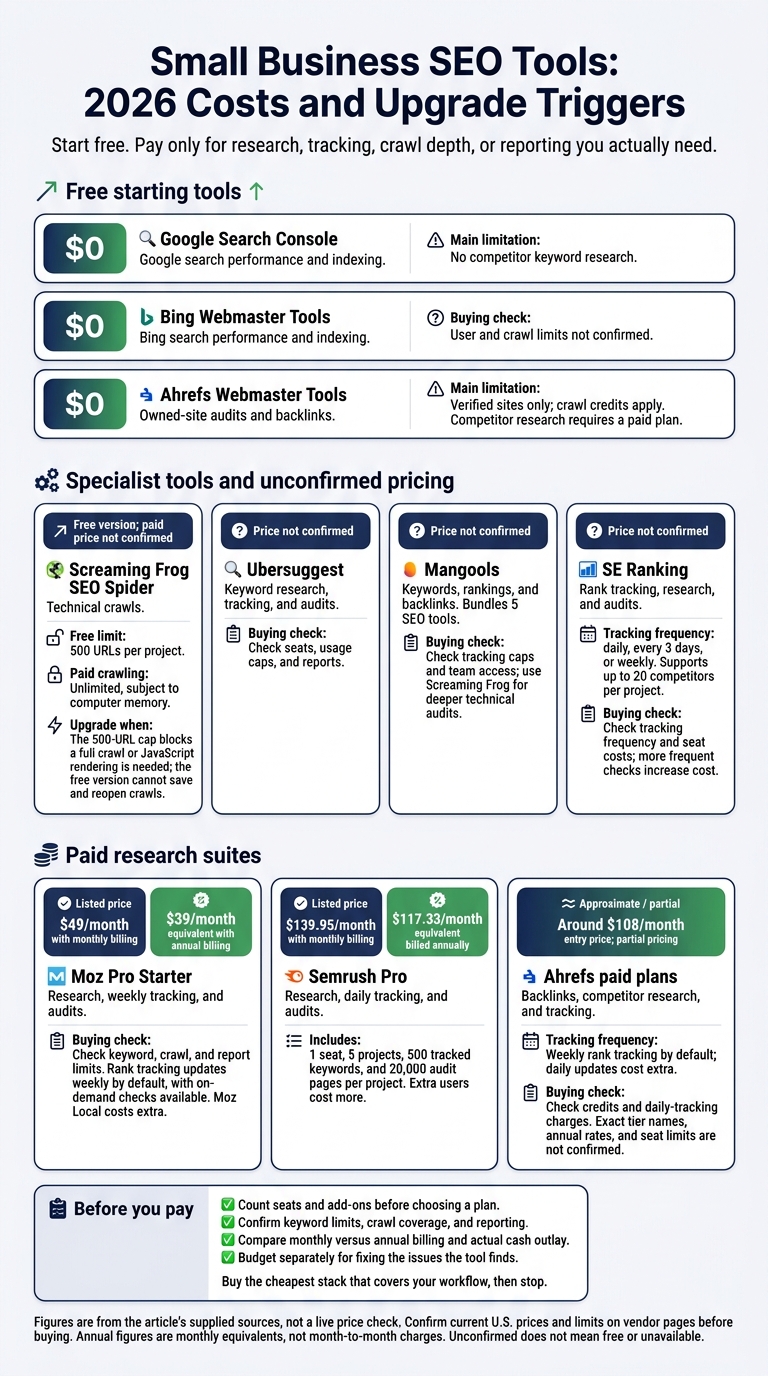
| Tool | Main use | Price listed in this comparison | Main limit or cost check |
|---|---|---|---|
| Google Search Console | Google search performance and indexing | $0 | No competitor keyword research |
| Bing Webmaster Tools | Bing search performance and indexing | $0 | User and crawl limits not confirmed |
| Ahrefs Webmaster Tools | Owned-site audits and backlinks | $0 | Verified sites only; crawl credits apply |
| Screaming Frog SEO Spider | Technical crawls | Free version; paid price not confirmed | Free version stops at 500 URLs |
| Ubersuggest | Keyword research, tracking, and audits | Not confirmed | Check seats, usage caps, and reports |
| Mangools | Keywords, rankings, and backlinks | Not confirmed | Check tracking caps and team access |
| Moz Pro | Research, weekly tracking, and audits | From $49/month | Check keyword, crawl, and report limits |
| SE Ranking | Rank tracking, research, and audits | Not confirmed | Check tracking frequency and seat costs |
| Semrush | Research, daily tracking, and audits | Pro: $139.95/month | 1 seat; extra users cost more |
| Ahrefs | Backlinks, competitor research, and tracking | Around $108/month entry price; partial pricing | Check credits and daily-tracking charges |
These figures come from the article’s supplied sources, not a live price check. Before buying, I’d confirm current U.S. prices and limits on vendor pages, compare monthly versus annual billing, and choose the lowest-cost option that covers the work.
Small Business SEO Tools: 2026 Costs and Upgrade Triggers
Best SEO Tools for Website 2026: All 10 Ranked (Two Are Free)
sbb-itb-fd64e4e
1. Google Search Console
Google Search Console is a free starting point for small businesses that want to track search visibility without paying for a subscription. It’s especially useful for solo founders and very small teams tracking their own site’s performance.
Features and Audit Depth
GSC reports impressions, query positions, CTR, indexing errors, and Core Web Vitals. It doesn’t offer competitor keyword research, keyword difficulty, or backlink gap analysis. Use it to monitor visibility and indexing, then turn to paid tools for competitor research and keyword-gap analysis.
Price and Billing
| Pricing or limit | What SMEs get |
|---|---|
| Native access | $0; no subscription or usage fees |
| Property permissions | Owner, Full, and Restricted access levels for sharing access |
| User cap | No numerical cap is specified in the supplied sources |
| Data retention | Typically 16 months |
| API quotas | Large data refreshes can hit API quotas |
| External reporting | Third-party reporting tools and connectors may add fees |
Reporting and Integrations
Use CSV or JSON exports for one-off reviews and the Looker Studio connector for dashboards. GA4 adds context about user behavior, while BigQuery export supports larger datasets.
GSC covers Google search data well. Bing Webmaster Tools adds a second free source of search performance data.
2. Bing Webmaster Tools
Price and Billing
Bing Webmaster Tools is a free tool for site owners.
| Pricing or limit | What SMEs get |
|---|---|
| Platform access | $0; no subscription or platform usage fees |
| User roles and user cap | Not specified in the supplied sources |
| Site cap and crawl quotas | Not specified in the supplied sources |
The supplied sources do not document permission levels or quotas.
Features and Audit Depth
Bing Webmaster Tools joins Google Search Console as the second free source in this comparison. Its dashboards show search data, indexing status, and URL indexing errors. Use it for basic diagnostics, not backlink or competitor research.
Reporting and Integrations
The dashboards help you monitor Bing indexing and technical issues. Add IndexNow to notify participating search engines when you create, update, or delete content. These notifications can speed up discovery and indexing.
Third-party rank trackers can also use Bing data. Small teams need paid tools for deeper keyword and backlink analysis.
3. Ahrefs Webmaster Tools
Ahrefs Webmaster Tools (AWT) adds free backlink and crawl data for verified sites after basic visibility tools.
Price and Billing
AWT is free for verified site owners who need technical audits and backlink data for their own site.
| Price or limit | What SMEs get |
|---|---|
| Subscription | $0 for verified site owners |
| Verification | Website ownership verified through Google Search Console or DNS records |
| Domain access | Verified sites only; competitor research requires a paid plan |
| Audit allowance | Limited crawl credits |
| Users and permissions | Not specified in the supplied sources |
| Backlink reporting limits | Backlink data for verified sites only |
Features and Audit Depth
Site Audit and Site Explorer cover technical issues and backlinks for verified sites. Crawl credits limit how much of a larger site you can audit.
Reporting and Integrations
Site Explorer adds backlink context to your site analysis. You can access AWT by verifying ownership through Google Search Console or DNS records.
For deeper crawl control on a budget, the next section covers a desktop crawler.
4. Screaming Frog SEO Spider
Price and Billing
Screaming Frog SEO Spider has a free version and a paid license.
| Price or limit | Free version | Paid license |
|---|---|---|
| Price | $0 | Not specified |
| Renewal cost | None | Not specified |
| Crawl limit | 500 URLs per project | Unlimited, subject to computer memory |
| Licensed users | Not specified | Not specified |
| Crawl settings | Limited configuration | Full configuration |
| Advanced features | No JavaScript rendering, scheduling, or saved crawls | Unlimited crawling; full configuration |
Features and Audit Depth
Screaming Frog SEO Spider is a technical-audit tool, not a visibility-reporting suite.
Use the paid license when the 500-URL limit prevents a full crawl or when a JavaScript-heavy site needs rendering that the free version cannot provide. The free version also cannot save and reopen crawls.
Users and Usage Limits
Licensed-user terms are not specified. The tool fits solo audits first. Small teams need the paid license only when 1 person handles crawls for larger sites.
Reporting and Integrations
The supplied sources do not specify reporting or integration details.
When crawl depth is no longer the main constraint, the next tools add keyword data and rank tracking.
5. Ubersuggest
Ubersuggest moves the comparison from crawl-focused tools to keyword research and rank tracking. Current U.S. pricing, keyword caps, crawl limits, and seat counts are unconfirmed. Verify them before budgeting.
Check whether its keyword research, rank tracking, and site audits offer enough depth for your site size. Before buying, also confirm shared access, exports, scheduled reports, integrations, and white-label support. Plan caps and reporting matter more than the headline price. For the next tools, the focus shifts from free access to clearer pricing and team limits.
6. Mangools
Mangools falls between basic, low-cost tools and larger SEO suites. It combines keyword research, rank tracking, and backlink analysis in one package.
Price and Billing
Mangools bundles 5 SEO tools. The supplied sources don’t list USD pricing, seat counts, or usage limits.
Features and Audit Depth
KWFinder handles keyword research, SERPWatcher tracks rankings, and SERPChecker reviews search engine results pages (SERPs). LinkMiner analyzes backlinks, while SiteProfiler provides site metrics. For deeper technical audits, use Screaming Frog.
Users and Usage Limits
Solo founders get research and tracking in one package. Small teams may outgrow the keyword-tracking caps on lower plans.
Reporting and Integrations
SERPWatcher’s Performance Index shows ranking progress. You can also move keywords from KWFinder into tracking projects. Compared with larger suites, Mangools offers less report customization and fewer integrations. Lower plans limit API access.
7. Moz Pro
Moz Pro is the first mid-tier option in this comparison. It costs more than budget tools but offers stronger reporting and backlink data.
Price and Billing
Moz Pro offers a 30-day free trial. The prices below are U.S. list prices.
| Plan | Monthly billing | Annual billing, per month | Limits and reporting |
|---|---|---|---|
| Starter | $49 | $39 | Lower keyword and crawl caps |
| Standard | $99 | $79 | Lower keyword and crawl caps |
| Medium | $179 | $143 | Expanded limits; scheduled branded reports |
| Large | $299 | $239 | Higher limits; same reporting as Medium |
| Premium | $599 | Not listed | Large-scale data needs |
Source:.
Features and Audit Depth
Keyword Explorer covers 1.25+ billion keywords and uses Priority to rank targets. Link Explorer indexes 35.5 trillion+ links and provides Domain Authority, Page Authority, Spam Score, and Link Intersect. Site Crawl runs weekly and ranks technical issues by impact.
Users and Usage Limits
Starter or Standard suits solo founders. Medium suits small teams that need stakeholder reports. Rank tracking updates weekly by default, with on-demand checks available when you need more frequent updates.
Reporting and Integrations
Starter and Standard have tighter report limits. Moz Pro supports Google Analytics integration and API access, while Moz Local costs extra.
The next tools offer broader suites, deeper automation, and higher seat costs.
8. SE Ranking
Price and Billing
Unlike Moz Pro’s fixed tiers, SE Ranking prices by usage. Check current USD rates before budgeting. As of October 3, 2026, the supplied sources do not confirm monthly or annual rates or exact plan limits.
Pricing depends on keyword volume and rank-check frequency: daily, every 3 days, or weekly. Extra seats add to the cost, while reporting, API, and branding features vary by plan.
Features and Audit Depth
SE Ranking offers local and mobile rank tracking across Google, Bing, and YouTube, alongside competitor research and site auditing. You can track up to 20 competitors per project.
Users and Usage Limits
Solo founders usually get the best value from weekly checks or checks every 3 days. Small teams should check seat costs and keyword caps first.
Reporting and Integrations
SE Ranking supports Google Analytics 4 (GA4), Google Search Console, and Looker Studio. White-label reporting and API options are also available. Confirm which plan includes API access and white-label reporting, along with any extra-seat charges.
For more keyword coverage and larger-scale reporting, compare Semrush next.
9. Semrush
Price and Billing
Semrush lists Pro, Semrush One, Guru, and Business. Check current plan names, rates, and limits before buying. Annual prices below are monthly equivalents billed annually. The sources don’t list an annual rate for Semrush One.
| Plan | Monthly | Annual: per month | Seats | Projects | Tracked keywords | Audit pages/project | Key reporting |
|---|---|---|---|---|---|---|---|
| Pro | $139.95 | $117.33 | 1 | 5 | 500 | 20,000 | Copilot, Position Tracking |
| Semrush One | $199.00 | N/A | 1 | 5 | 500 | 20,000 | Pro + AI Visibility Toolkit |
| Guru | $249.95 | $208.33 | 1 | 15 | 1,500 | 20,000 | Historical data, ChatGPT search tracking |
| Business | $499.95 | $416.33 | 1 | 40 | 5,000 | 20,000 | API access, white-labeling, Looker Studio |
Features and Audit Depth
Keyword Magic Tool draws on more than 26 billion keywords. Keyword Gap finds terms your competitors rank for but you don’t. Position Tracking updates daily and supports device and ZIP-code targeting. Site Audit flags 130+ technical issues and ranks fixes by severity.
Users and Usage Limits
Pro suits solo founders and freelancers who need core SEO data and competitor research. Guru adds historical data and higher project and keyword limits. Extra seats cost more, so teams should request a quote that includes all required seats.
Semrush One combines Pro with the AI Visibility Toolkit. At the supplied rates, buying Pro and the separate $99/month add-on would cost $238.95/month, compared with $199.00/month for Semrush One.
Reporting and Integrations
Paid plans connect to Google Analytics and Search Console and include daily insights from Semrush Copilot. Business adds API access. Client-ready reports include white-label and branded options, while Looker Studio integration is highlighted for agency use.
Ahrefs follows as the other premium option in this comparison.
10. Ahrefs
Ahrefs is a premium alternative to Semrush. Its focus is backlink research and rank tracking, not budget pricing.
Price and Billing
The source confirms an entry plan at around $108/month and top-tier pricing above $500/month. It does not confirm exact tier names, annual rates, or seat limits, so the published pricing details are partial.
Features and Audit Depth
Paid plans go beyond verified-site limits, adding competitor-domain research, full Keyword Explorer, and Rank Tracker. Site Explorer links ranking positions with organic traffic estimates and backlink profiles. Site Audit supports full-site crawls and helps prioritize technical issues.
These tools make Ahrefs useful when free verified-site tools no longer cover your needs.
Users and Usage Limits
Solo founders can use the entry plan for competitor and keyword research beyond what’s available in free Webmaster Tools. Small teams need higher tiers to track more projects, though Ahrefs’ credit system can make costs harder to budget.
Rank tracking updates weekly by default. Daily updates cost extra.
Reporting and Integrations
Rank Tracker reports SERP feature ownership, including featured snippets, People Also Ask, and top stories.
SEO Tools Compared: Prices, Features, and Limits
Use this section to compare verified prices, seats, crawl depth, and reporting. “Not verified” means the supplied sources did not confirm the detail.
Price alone doesn’t tell you what a plan buys. Check how many users, tracked keywords, and crawl runs it includes. The tables show where free tools stop and paid plans offer more.
Prices and Billing Terms
Google Search Console, Bing Webmaster Tools, and Ahrefs Webmaster Tools each cost $0.
| Tool | Monthly price | Billing notes |
|---|---|---|
| Moz Pro Starter | $49 | Entry-level plan |
| Semrush Pro | $139.95 | Extra seats cost more |
| SE Ranking | Not verified | More frequent checks increase the cost |
| Mangools | Not verified | Budget suite with tighter keyword limits |
| Ahrefs paid plans | Not verified | Daily tracking is a paid add-on |
Features and Audit Depth
| Tool | Keyword research and rankings | Backlinks and competitors | Technical audits |
|---|---|---|---|
| Google Search Console | Search impressions and keyword positions | Not verified | Indexing errors |
| Mangools | Tighter tracking limits | Not verified | Not verified |
| Moz Pro | Keyword research | Strong keyword, backlink, and crawl depth | Weekly crawls with prioritized alerts |
| SE Ranking | Tracking daily, every 3 days, or weekly | Not verified | Not verified |
| Semrush | Daily rank tracking and broad keyword/backlink coverage | Broad competitor research | Deep site audits with a 20,000-page cap per project |
| Ahrefs paid plans | Weekly tracking; daily updates cost extra | Not verified | Not verified |
Seats, Usage, and Reporting
Check usage limits alongside the monthly price, especially for small teams. Seats, tracked keywords, and crawl frequency can matter just as much as the plan’s cost.
| Tool | Seats / projects | Limits and usage notes | Reporting and exports |
|---|---|---|---|
| Google Search Console | Not verified | Free publisher tool, not a keyword-research suite | Search-performance tracking confirmed; export limits not verified |
| Mangools | Not verified | Tighter keyword-tracking limits | Not verified |
| Moz Pro | Higher tiers support 2 or 3 seats | Weekly crawl | Not verified |
| SE Ranking | Not verified | More frequent checks increase the cost | Not verified |
| Semrush Pro | 1 user; 5 projects; extra seats cost more | 500 tracked keywords | Reporting and add-on limits not fully verified |
| Ahrefs paid plans | Not verified | Budget for tracking add-ons | Not verified |
The next section uses these trade-offs to recommend tools for solo founders and teams of different sizes.
Pros and Cons by Business Size
Choose tools based on budget, team size, and workload. Solo founders should favor free tools or 1 paid tool with simple reporting. Small teams should check seat costs, automation, and implementation time first.
| Tool | Main advantage | Main limitation | Best-fit user | Switch when… |
|---|---|---|---|---|
| Google Search Console | Direct Google data; free | No competitor research | Solo founder or small team | You need competitor gap analysis. |
| Bing Webmaster Tools | Free Bing indexing data | Covers Bing rather than Google | Solo founder or small team | You need broader research or reporting. |
| Ahrefs Webmaster Tools | Free backlink and audit data for owned sites | Verified domains only; limited crawl credits | Solo founder | You need competitor research. |
| Screaming Frog SEO Spider | Detailed technical crawl analysis | Desktop-based; free crawls limited to 500 URLs | Solo marketer or small team | You need cloud-based automated audits. |
| Ubersuggest | Beginner-friendly interface | Pricing, seats, and limits unconfirmed | Solo founder | You need deeper data or confirmed team limits. |
| Mangools | Simple interface and built-in tracking | Lower keyword-tracking limits | Solo founder or small team | You manage high-volume keyword lists. |
| Moz Pro | Established authority metrics | Weekly rank updates by default | Solo marketer or small team | You require daily rank tracking. |
| SE Ranking | Broad feature set; flexible tracking frequency | Current pricing and seat limits unconfirmed | Growing SME | You need a full digital marketing suite. |
| Semrush | Broad research and daily tracking | Higher cost; extra seats cost more | Small team or growing SME | You only need core SEO tools. |
| Ahrefs | Large backlink index | Credit-based pricing; daily tracking costs extra | Solo marketer or small team | You need predictable costs on a strict budget. |
The table shows 2 common buying patterns: free-first for solo operators and paid automation for small teams. Solo founders should start with GSC, Bing Webmaster Tools, and AWT. Add 1 paid tool when tracking, crawl depth, or reporting needs exceed the free limits.
Upgrade when limits leave important pages unmonitored or manual reporting takes too much time. Before paying more, confirm seat allowances, automated reports, and support for branded PDFs or a client portal.
Audits find problems, but someone still needs to prioritize fixes, update content, and measure results. If your team can’t do that work in-house, include outside help in the SEO budget.
Robust Branding can handle audits, content strategy, backlink work, or local SEO when your team can’t implement fixes. Require a written scope, ownership terms, reporting cadence, and completed deliverables.
Conclusion: Choose by Budget and Team Size
Budget for actual cash outlay, not the advertised monthly rate. Solo founders can start free. Small teams should add 1 paid tool only when needed. Use the comparison above to find the lowest-cost plan that covers your workflow.
| Monthly budget | Plan and billing | Key differentiator | Business fit |
|---|---|---|---|
| $0 | Google Search Console + Bing Webmaster Tools; no subscription | Core site visibility and indexation | Solo founders monitoring their own sites |
| Under $50 | Moz Pro Starter: $49/month; annual equivalent $39/month | Basic SEO research and tracking; verified limits not listed | Best for solo users with basic needs |
| $50–$99.99 | Moz Pro Standard: $99/month; annual equivalent $79/month | 1 seat | Small businesses with 1 person handling SEO |
| $100 or more | Semrush Pro: $139.95/month; annual equivalent $117.33/month | 1 user; extra seats cost more | Freelancers and small teams that need broader research and can pay for extra seats |
Free tools cover the basics. Paid tools make sense only when the time they save is worth more than their cost.
Buy the cheapest stack that covers your workflow, then stop. Budget and team size matter more than feature count. Before committing to annual billing, check that audit coverage and reporting justify the cost – and set aside time to fix the issues the tool finds.
FAQs
How can I tell if a paid SEO tool is worth it?
The value of the time saved should be at least 2 times the tool’s monthly cost. Before buying, calculate the total cost of ownership: the subscription, per-client fees, source connectors, extra users, and usage overages.
Run a 10-14-day pilot with a small data sample to test accuracy, connector reliability, and dashboard load times. Before signing a contract, confirm that the tool meets your security and compliance requirements, such as SOC 2 or ISO 27001.
How do I avoid paying for overlapping SEO features?
Estimate your total cost before subscribing. Find the bottlenecks in your workflow, then use free trials to test tools against your content calendar. Choose tools that remove steps, not just make them faster.
For solo operators and small teams, start with all-in-one toolkits. If your budget is tight, combine free tiers from specialized tools. Check per-seat fees, API quotas, and usage overages. Ask vendors for their overage rates and a written no-surprise billing policy.
How should I test an SEO tool before subscribing?
Run a 10-14-day evaluation using a free trial or free tier. Test the tool against your day-to-day needs and actual content calendar. Measure time saved on research, auditing, and optimization – not marketing claims.
Compare rank tracking results with manual checks, review audit findings for false positives, and verify backlink data recall. If you’re migrating, budget 1 week for setup and 2 weeks running both tools to confirm data consistency before switching.